


Email Scams & How To Stay Safe

Now, it may just be me, but I've noticed a significant uptick in the number of suspicious emails impersonating different business' and services appearing in my email's inbox, and despite being in the know on this subject, I've been caught out before; I clicked the link.
It took me to a form that was a dead giveaway of being a phishing scam. Thankfully, that's all it was, a form page I could click away from and forget about. Additionally ensuring the page didn't download anything in the background by running a Full System Scan via Windows Defender, which should be scheduled and performed regularly anyway. My system was clean, my data safe. This time.
Whilst I was lucky, merely clicking a link in one of those suspicious emails can be enough to give your valuable personal information to bad-actors. The best advice for this is if you aren't 100% certain that a link in your email is valid and legitimate;
DO NOT CLICK THE LINK!
(unless you are certain of it's origin)
If you are ever unsure about an email link either ignore it, or if that doesn't feel like an option the best course of action, I think, is to manually visit the business' or services website mentioned in the email directly via your preferred web browser or contact them via contact details you know to be legitimate (never trust the contact details provided in a suspect email). If you are unsure about an email or not confident in checking their website, ask for help. Even if it turns out to be legitimate, it is better to doublecheck than to fall victim to a trick. Some of the ways to ask for help include but are not limited to;
-Ask someone else in the house or office to have a look, see what they reckon.
-Take a screenshot and send it to someone you trust asking what they think.
-Google the suspicious email to see if others have reported similar, often scam attempts are send to 1000+ email address.
-Give me a call or send a message, I'd be happy to have a look, answer any question or provide advice. This may sound inconvenient, and at times it is, but it is best to remain vigilant and secure when going through your email and online accounts. Especially as everything moves further online, often with few options to actually talk to a real support person when questions or problems inevitably arise.
Below are some examples I myself have received of scam email attempts,

Despite appearing like a Bunnings promotional email, it comes from a very suspicious email address. If you are unsure, check the sender email, if it seems strange, it almost certainly is.
For example, all email contact from Bunnings to customers will come from an email address ending in: "@emails.bunnings.com.au", not whatever that weird address is.
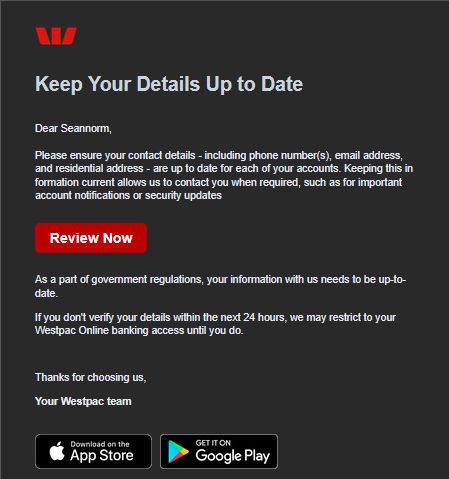
This one is a bit more dangerous as it is attempting to gather all the information required to access your bank accounts (and much more) by pretending to be an email from WestPac Bank.
Besides the shady email address, most companies will never ask for your personal details via email, banks especially.
As good practice, any email asking for personal details is likely not legitimate.

This last example is a bit more aggressive, it's pretending to be from Apple and threatening immediate data loss and suspension if money isn't paid.
No legitimate company will act this way. If they do, you've likely got a great pay-day in your future :)
But if you do get an email with such threats of actions, know that it is likely a scammer attempting to scare you into clicking the link or, worse, paying the scammer.
Whilst these 3 examples cover a decent breadth of the sorts of email you may get, know that the people making them are creative and do make new attempts at impersonation and come up with new tricks all the time. I'll look to provide any new examples here on this site as and when I receive new examples of scams myself. But just remember the following, and you can be that little bit more confident when online:
-Do not click email links, as convenient as they may be, manually go to the site you know to double-check.
-Check the sender address, if it seems off, it almost certainly is. Google the business' or groups contact details to double check the email address a legitimate message would come from.
-Ask for help or a second / third opinion before clicking any link you may be even slightly unsure of. Better safe than sorry.
This one may be hard to do for many reasons, but if you don't want to ask someone you know or don't have someone around, feel free to call or message me, I'd be more than happy to provide answers and advice.
Thank you kindly for your time reading this post, I expect to post more updates regarding scams online and how to avoid them, so if that's something that interests you, come on back :)
Thanks again! Sean J Normoyle
Comments